Part of the reason I decided to split "Safe memory usage in C#" into two parts was simply that the entire article would be very large for a post.
The other, perhaps most important part, was to gauge people's reactions and comments. When an explanation fails to meet a reader's needs, he will not be able to understand the discussed topic. Some people react with polite inquiry, some will suggest superficially similar solutions that they do understand, while others take a more aggressive stance by stating that the topic is stupid anyway.
Judging from the blog post comments and the Reddit comments, I see that there are some points that require more detail. I humbly apologize that I could not be clear enough in the initial post, but hopefully I will learn from this and write clearer posts in the future. :) So, to answer your inquires:
Object pools are not used to prevent out of memory errors. - This is correct, but not sequitur. The Linear Memory is also not an object pool. It is a pre-allocated sequential memory pool.
Your 'safe memory usage' is not safe at all, for the love of Christ. - I can't really argue against this, as it is an emotionally laden religious argument. If you can elaborate a bit on the technicals of why you believe it is not safe, I shall be happy to explain further.
You'll hit OOM when you deserialize them, and much sooner. - My very simplified Hello World introductory example is probably to blame for this one. The objects should not be "serialized" and "deserialized", they should be created, manipulated, and used entirely within the LinearMemory. You will be happy to know that the more advanced examples I have lined up for part two does exactly that!
There exists a rather advanced technique for really reserving memory [...] CriticalFinalizerObject - Good point! I can see how this class comes to mind after reading "safe shutdown" in the first part of the introductory paragraph. While it is sufficient for many purposes, the major drawbacks are that while the CFO solves the "safe shutdown" problem, its memory usage is not as controlled, and you cannot create such objects when you have run out of memory.
It is also possible to make a very limited use of pointers in unsafe context - Also a good point. Though I strongly suggest against dabbling in an unsafe context - for obvious reasons!
Showing only the first [...] part of the [...] post adds insult to injury. - I am sorry that you took this as an insult. Hopefully, after reading this post, you will understand my motivations.
If you wanted C, why didn't you just use C? - I don't want C - it is neither platform-independent, type safe, or has a good standard library and vibrant community. I want only to emulate parts of its more redeemable features in small, controlled parts of larger projects.
As soon as he implied that leaving a server running would cause out of memory errors in a completely different process, he demonstrated that he really doesn't understand virtual memory at all. - I always feel ill at ease responding to people who comment with the "smackdown" approach. Not because the comment itself hurts my feelings or some such, but because if I point out errors in their post I make them look rather stupid in front of everyone. That would make me feel bad, so that's why I politely decide to reply here instead of directly in the Reddit comments: You forget that virtual memory is still finite. That means one process can still use too much of available (virtual and physical) memory, leaving not enough for your process.
I hope that should make everyone happy. :) If you have any more questions, please do not hesitate to use the comment field below. I leave anonymous comments open specifically to encourage questions.
Thursday, 22 April 2010

Saturday, 17 April 2010
Safe memory usage in C# part 1/2
Update: Part two is now available here.
Usually, the C# garbage collector does a pretty good job. The problem is, however, that you constantly run the risk of running out of memory in the middle of a program.
How big a problem is the dreaded OutOfMemoryError exception?
Well, imagine in the most benign case that you are programming a game. The player accidentally leaves his Oracle server running in the background, and is unaware that he doesn't really have enough memory for the entire game. After playing until the climatic ending with 302 enemies on the screen at once, he is hit in the face with an OutOfMemoryError crash. He is not happy, and will likely whine on your forums for weeks to come.
In the more serious case, imagine that you are running Critical Server Application (I made up that name - it's just an example). The server controls something critical, like the lock on the fire escape door, or a nuclear reactor cooling rod. When the application crashes, you really need it to leave its now uncontrolled fire door or nuclear reactor in a safe state by doing something like unlock the fire door or shut down the reactor.
Yikes! How can I ensure safety?
Turns out, this problem is well known in the game programming industry, and there is a well-known solution to it. Simply allocate a ton of memory up front and do manual memory management yourself!
Really? That easy?
Well, not actually easy; manual memory management is both boring and tricky to do yourself. Doing that for every object in your application would be too much effort for most people. You should aim for a middle ground where you only have critical data in the up-front-heap.
In the game scenario, you can build the game save object in the up-front-heap, so you will always be able to save the game in the event of a crash. Your user can then shut down whatever program is eating up his memory and pick up the game from where it crashed.
In the nuclear reactor scenario, you can carefully utilize only the up-front-heap during safe shutdown. In the event of a program crash, you will always be able to shut down the reactor.
The code
So of course I had to code this. :)
I decided to keep the API close to the well-known C-style memory management functions and use the names "malloc", "free" and "memcpy". The whole linear memory manager is of course implemented as a wholly static class, which looks like this:
As with the original C functions, calling malloc() gets you a pointer to a memory area of the requested size and ensures that it will not be returned on another call to malloc() until you free() it.
The memory is accessed via the LinearMemory.mem member which is just an array of bytes. If you have malloc()-ed 5 bytes to pointer p, you can use mem[p+0], mem[p+1] ... mem[p+4] for whatever purpose you want.
Keeping track of which memory is allocated is done via the LinearMemory.bounds member, which is a boolean array of the same length as the LinearMemory.mem byte array. When reserving a chunk of memory from 40 to 49, we simply set up "fenceposts" by setting bounds[40] and bounds[49] to true to mark the area as reserved. This way the malloc() function can just scan for the first big enough chunk of memory that is outside two "fenceposts", and the free() function can just scan along the memory from the given pointer to the next "fencepost" to know exactly which memory chunk to free. Since the bounds array takes up only 1/8 (remember, a boolean need only 1 bit!) of the mem array, it's not much overhead. If we say that the mem array is of size O(n), then the bounds array is of size O(n/8)=O(n).
This gives us a total of O(2n), which is linear. Since you can't go better than linear when dealing with memory, this model is pretty tight.
How do I store my strings and ints in there, then?
In C#, you can convert any data structure to a bunch of bytes. In this post, I will show you how to do this with strings. In the next post, I'll do some more complex data structures:
Stringing it all together
Now that we have all we need, let's try a test run with some strings:
Then we create a simple winforms app to run it. The window looks like this:

And this is the codebehind:
Don't worry, I will include the full solution with all files in the next post.
Running it gives us:
Nice!
So, what really happened? Well, as you can see from the source code, we have successfully stored the string "Hello world!" in our LinearMemory, copied it 10 times, and retrieved and printed out the copies.
Coming up...
In the next post, I will show you how create, use and retrieve more complex real-world structures whose data live entirely in the LinearMemory. Stay tuned!
Usually, the C# garbage collector does a pretty good job. The problem is, however, that you constantly run the risk of running out of memory in the middle of a program.
How big a problem is the dreaded OutOfMemoryError exception?
Well, imagine in the most benign case that you are programming a game. The player accidentally leaves his Oracle server running in the background, and is unaware that he doesn't really have enough memory for the entire game. After playing until the climatic ending with 302 enemies on the screen at once, he is hit in the face with an OutOfMemoryError crash. He is not happy, and will likely whine on your forums for weeks to come.
In the more serious case, imagine that you are running Critical Server Application (I made up that name - it's just an example). The server controls something critical, like the lock on the fire escape door, or a nuclear reactor cooling rod. When the application crashes, you really need it to leave its now uncontrolled fire door or nuclear reactor in a safe state by doing something like unlock the fire door or shut down the reactor.
Yikes! How can I ensure safety?
Turns out, this problem is well known in the game programming industry, and there is a well-known solution to it. Simply allocate a ton of memory up front and do manual memory management yourself!
Really? That easy?
Well, not actually easy; manual memory management is both boring and tricky to do yourself. Doing that for every object in your application would be too much effort for most people. You should aim for a middle ground where you only have critical data in the up-front-heap.
In the game scenario, you can build the game save object in the up-front-heap, so you will always be able to save the game in the event of a crash. Your user can then shut down whatever program is eating up his memory and pick up the game from where it crashed.
In the nuclear reactor scenario, you can carefully utilize only the up-front-heap during safe shutdown. In the event of a program crash, you will always be able to shut down the reactor.
The code
So of course I had to code this. :)
I decided to keep the API close to the well-known C-style memory management functions and use the names "malloc", "free" and "memcpy". The whole linear memory manager is of course implemented as a wholly static class, which looks like this:
// LinearMemory.cs
namespace LinearMemoryEntry {
    using System.Linq;

    static class LinearMemory {
        public static byte[] mem;
        private static bool[] bounds;

        static LinearMemory() {
            // Allocate 10 megabytes initially.
            mem = new byte[1024 * 1024 * 10];
            bounds = new bool[mem.Count()];
            for (int i = 0; i < mem.Count(); bounds[i++] = false) ;
        }

        /// <summary>
        /// Allocate memory.
        /// </summary>
        /// <param name="size">Size of memory to allocate.</param>
        /// <returns>Ptr to newly allocated memory</returns>
        public static int malloc(int size) {
            int ptr = FindArea(0, size);
            bounds[ptr] = true;
            bounds[ptr + size - 1] = true;
            return ptr;
        }

        /// <summary>
        /// Free allocated memory.
        /// </summary>
        /// <param name="ptr">Ptr to allocated memory.</param>
        public static void free(int ptr) {
            bounds[ptr] = false;
            int i = ptr;
            while (!bounds[++i]);
            bounds[i] = false;
        }

        /// <summary>
        /// Copy a chunk of memory.
        /// </summary>
        /// <param name="srcPtr">Memory to copy from.</param>
        /// <param name="tgtPtr">Memory to copy to.</param>
        /// <param name="len">Length of memory chunk.</param>
        public static void memcpy(int srcPtr, int tgtPtr, int len) {
            for (int i = 0; i < len; i++)
                mem[tgtPtr + i] = mem[srcPtr + i];
        }

        private static int FindArea(int from, int size) {
            tryAgain:
            int foundSize = 0;
            int at = from;
            while (foundSize < size) {
                if (at >= mem.Count())
                    throw new OutOfMemoryException();
                if (bounds[at]) {
                    while (!bounds[++at]) ;
                    from = at + 1;
                    goto tryAgain;
                }
                foundSize++;
                at++;
            }
            return from;
        }
    }
}
As with the original C functions, calling malloc() gets you a pointer to a memory area of the requested size and ensures that it will not be returned on another call to malloc() until you free() it.
The memory is accessed via the LinearMemory.mem member which is just an array of bytes. If you have malloc()-ed 5 bytes to pointer p, you can use mem[p+0], mem[p+1] ... mem[p+4] for whatever purpose you want.
Keeping track of which memory is allocated is done via the LinearMemory.bounds member, which is a boolean array of the same length as the LinearMemory.mem byte array. When reserving a chunk of memory from 40 to 49, we simply set up "fenceposts" by setting bounds[40] and bounds[49] to true to mark the area as reserved. This way the malloc() function can just scan for the first big enough chunk of memory that is outside two "fenceposts", and the free() function can just scan along the memory from the given pointer to the next "fencepost" to know exactly which memory chunk to free. Since the bounds array takes up only 1/8 (remember, a boolean need only 1 bit!) of the mem array, it's not much overhead. If we say that the mem array is of size O(n), then the bounds array is of size O(n/8)=O(n).
This gives us a total of O(2n), which is linear. Since you can't go better than linear when dealing with memory, this model is pretty tight.
How do I store my strings and ints in there, then?
In C#, you can convert any data structure to a bunch of bytes. In this post, I will show you how to do this with strings. In the next post, I'll do some more complex data structures:
// LinearMemoryTools.cs
using System;
using System.Collections.Generic;
using System.Linq;
using System.Text;

namespace LinearMemoryEntry {
    /// <summary>
    /// Useful tools for marshalling and unmarshalling data to and from
    /// LinearMemory.
    /// </summary>
    class LinearMemoryTools {
        // An encoding can access the bytes of a string.
        private static Encoding enc = new ASCIIEncoding();

        // Insert byte[] into memory.
        public static void Insert(int ptr, byte[] src) {
            for (int i = 0; i < src.Count(); i++)
                LinearMemory.mem[ptr + i] = src[i];
        }

        /// <summary>
        /// Access the bytes of a string.
        /// </summary>
        /// <param name="s">The string.</param>
        /// <returns></returns>
        public static byte[] StringBytes(string s) {
            return enc.GetBytes(s);
        }

        /// <summary>
        /// Retrieve a string from memory.
        /// </summary>
        /// <param name="ptr">Ptr to string.</param>
        /// <param name="len">Len of string.</param>
        /// <returns></returns>
        public static string BytesString(int ptr, int len) {
            return enc.GetString(LinearMemory.mem, ptr, len);
        }
    }
}
Stringing it all together
Now that we have all we need, let's try a test run with some strings:
// HelloWorldFactory.cs
namespace LinearMemoryEntry {
    using System.Windows.Forms;

    class HelloWorldFactory {
        public static void Run(TextBox stdout) {
            // The string "Hello world!".
            string helloworld = "Hello world!";

            // Allocate memory for our text.
            int p = LinearMemory.malloc(13);

            // Put our text into the linear memory.
            LinearMemoryTools.Insert(
                p, LinearMemoryTools.StringBytes(helloworld));

            // Make some copies!
            int[] p_copy = new int[10];
            for (int i = 0; i < 10; i++) {
                p_copy[i] = LinearMemory.malloc(13);
                LinearMemory.memcpy(p, p_copy[i], 13);
            }

            // Print out all copies.
            for (int i = 0; i < 10; i++) {
                var s = LinearMemoryTools.BytesString(p_copy[i], 13);
                stdout.Text += "\r\nCopy " + (i + 1) + ": " + s;
            }

            // Always remember to free memory when you are finished with it!
            LinearMemory.free(p);
            for (int i = 0; i < 10; LinearMemory.free(i++)) ;
        }
    }
}
Then we create a simple winforms app to run it. The window looks like this:

And this is the codebehind:
// Form1.cs
using System;
using System.Collections.Generic;
using System.ComponentModel;
using System.Data;
using System.Drawing;
using System.Linq;
using System.Text;
using System.Windows.Forms;

namespace LinearMemoryEntry {
    public partial class ProgramForm : Form {
        public ProgramForm() {
            InitializeComponent();
            this.FormClosed += new FormClosedEventHandler(
                ProgramForm_FormClosed);
        }

        void ProgramForm_FormClosed(object sender, FormClosedEventArgs e) {
            Application.Exit();
        }

        // Run HelloWorld button
        private void button1_Click(object sender, EventArgs e) {
            textBox1.Text += "\r\nRunning HelloWorld...";
            HelloWorldFactory.Run(textBox1);
        }

        // Clear button
        private void button2_Click(object sender, EventArgs e) {
            textBox1.Clear();
        }
    }
}
Don't worry, I will include the full solution with all files in the next post.
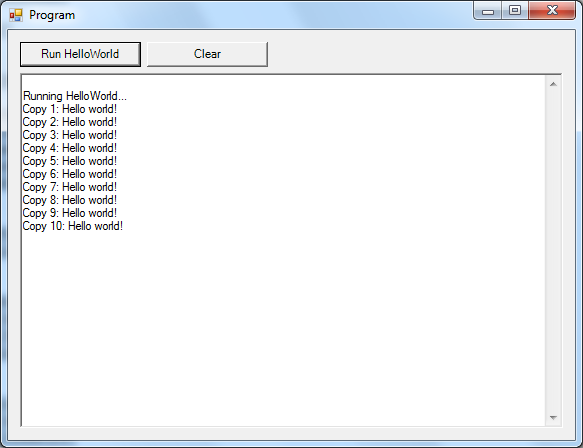
Running it gives us:
Nice!
So, what really happened? Well, as you can see from the source code, we have successfully stored the string "Hello world!" in our LinearMemory, copied it 10 times, and retrieved and printed out the copies.
Coming up...
In the next post, I will show you how create, use and retrieve more complex real-world structures whose data live entirely in the LinearMemory. Stay tuned!
Wednesday, 14 April 2010
Real Number Generator
Du you like numbers? I sure do! I was reading up on the number Aleph-naught recently and thought it would be fun to implement Cantor's diagonal theory as a C# enumerator over doubles.
As much fun as it was to write, the generator also turned out to be a very versatile tool that I'm finding new uses for each day. But, before going into detail on its many many uses, I'll give a short demonstration of how it works.
The code
Let's start with the simple stuff, our class needs to implement IEnumerable<double> and IEnumerator<double> so we can use it in a foreach branch:
First off, our class need some state. I assume you have already read the diagonal theory, so it is obvious we need two integers n and m which are basically row and column coordinates on an infinite table where each row is a list of all integers:
Now we get to the important bit, the IEnumerator.MoveNext() which advances the state one tick:
If you try this out for yourself a bit on a subset of the infinite table on paper, you will see how this diagonal method of movement will eventually touch each and every table cell you can think of. Since we can never run out of integers, the call always succeeds by returning true.
Now on to the other slightly tricky bit, we need to get this state represented as a double (real) number. This is done by procedurally generating the contents of the cell in row n column m of the infinite table. Remembering that each real number consists of an integral part and a fractional part, it is immediately obvious that we can just let the numbers n and m "run out from" the decimal separator. I.e., n gets to be the integral part and a reversed representation of m gets to be the fractional part. In code:
And we're basically done! After adding some boilerplate to get it to compile, the complete class file looks like this:
A simple usage of the RNG which outputs every number you can think of if you wait long enough:
And that's the proof of the pudding! Feel free to steal this code and use it for your own projects.
The uses
So we've got our fancy new generator up and running, but for what purpose? As I mentioned, its uses are manifold, but I'll just describe the two biggest use cases:
You need a bunch of numbers in a hurry.
The most common use of a number generator is just retrieving arbitrary numbers for unit test data generation, example data, etc. You don't want your test data to have any linear patterns, because linear patterns tend to be too regular to give the tested code a good straining. Also, example data with linear patterns is proven to be hard to understand for most users. Going for a full random number generator is not good either, because since it produces random results, there is no easy way to re-run the exact same tests when you see a problem. Solution: The Real Number Generator.
A cheap, efficient and secure random number generator.
I know this point is highly controversial and hard to "get", but you should do yourself a favour and at least try to understand the following explanation on how it works out. I believe all programmers should strive to learn new things, even if they are a little difficult to grasp.
First off, some terminology. Since random number generators are often confusingly referred to as RNGs, let us call them RaNGs here to differentiate them from real number generators.
That the RNG is cheap and efficient compared to a RaNG is obvious, so I won't go into that here. I will rather explain how it qualifies as a random number generator. First, let us observe that the word "random" simply means "without uniformity". Since our generator can be mathematically proven not to generate uniform numbers, it is by definition a completely valid random number generator.
We usually expect more of our RaNGs, though; we expect them to satisfy the other definition of "random", namely "occurring without definite aim, reason, or pattern". While a normal user might see a pattern in the outputted numbers, if we simply drop 6 out of every 7 number from the generator, we will get a list of numbers that really have no obvious pattern. For instance, the first such 9 numbers are [1.0, 1.2, 5.0, 5.1, 6.1, 8.0, 1.7, 4.5, 8.2], which appears random enough for most users.
I know you - a well-educated programmer - will probably be able to guess the nature of this sequence and start predicting the next number, but remember that the person who will end up using your software is a normal human being that first off likely doesn't have your math skills, and most importantly have no interest in analyzing seemingly random numbers! To your users it will be random, and your users are what should matter. Countless old and wise developers constantly urge us to think like a user. Let us take their advice.
Should you for some reason really need truly random numbers, that can be fixed easily. Instead of skipping 6 out of every 7 numbers, use a RaNG to skip a random amount of numbers between each output number! Why not just use the RaNG directly instead? I'm glad you asked, because that brings us to the last bit; why this is a secure random number generator:
Note that plain RaNG can output any number at any time. This will occasionally cause problems when the same number is repeated twice in a row, or the same sequence of numbers is repeated after just a short interval. For example, this causes massive outrage when two lottery sequences are repeated twice in a short time. While one can always opt for a lengthy debate with the uninformed public on why such repetitions are bound to happen sooner or later, it is safer just to guarantee that the issue never comes up. Since the RNG provably never repeats itself, it has the terribly useful property that it is secure from repetition.
That's all for this time, thanks for reading! And remember, the code is free to copy and use for any purpose. :-)
If you felt anything was a bit hard to understand, just drop a comment below and I'll try my best to give a helpful response.
As much fun as it was to write, the generator also turned out to be a very versatile tool that I'm finding new uses for each day. But, before going into detail on its many many uses, I'll give a short demonstration of how it works.
The code
Let's start with the simple stuff, our class needs to implement IEnumerable<double> and IEnumerator<double> so we can use it in a foreach branch:
class RNG : IEnumerable<double>, IEnumerator<double> {
}
First off, our class need some state. I assume you have already read the diagonal theory, so it is obvious we need two integers n and m which are basically row and column coordinates on an infinite table where each row is a list of all integers:
class RNG : IEnumerable<double>, IEnumerator<double> {
    private int n;
    private int m;
    void IEnumerator.Reset() {
        n = 0;
        m = 0;
    }
}
Now we get to the important bit, the IEnumerator.MoveNext() which advances the state one tick:
bool IEnumerator.MoveNext() {
    if (n == 0) {
        n = m + 1;
        m = 0;
    } else {
        n -= 1;
        m += 1;
    }
    return true;
}
If you try this out for yourself a bit on a subset of the infinite table on paper, you will see how this diagonal method of movement will eventually touch each and every table cell you can think of. Since we can never run out of integers, the call always succeeds by returning true.
Now on to the other slightly tricky bit, we need to get this state represented as a double (real) number. This is done by procedurally generating the contents of the cell in row n column m of the infinite table. Remembering that each real number consists of an integral part and a fractional part, it is immediately obvious that we can just let the numbers n and m "run out from" the decimal separator. I.e., n gets to be the integral part and a reversed representation of m gets to be the fractional part. In code:
double IEnumerator<double>.Current {
    get {
        string integralPart = n.ToString();
        char[] fracChars = m.ToString().ToCharArray();
        Array.Reverse(fracChars);
        string fractionalPart = new string(fracChars);
        // CultureInfo.InvariantCulture just means that this code won't crash
        // on you if your country uses something else than "." as the decimal
        // inductor.
        return double.Parse(integralPart + "." + fractionalPart,
                            CultureInfo.InvariantCulture);
    }
}
And we're basically done! After adding some boilerplate to get it to compile, the complete class file looks like this:
using System;
using System.Collections;
using System.Collections.Generic;
using System.Globalization;

namespace RealNumberGenerator {
    class RNG : IEnumerable<double>, IEnumerator<double> {
        private int n;
        private int m;

        bool IEnumerator.MoveNext() {
            if (n == 0) {
                n = m + 1;
                m = 0;
            }
            else {
                n -= 1;
                m += 1;
            }
            return true;
        }

        double IEnumerator<double>.Current {
            get {
                string integralPart = n.ToString();
                char[] fracChars = m.ToString().ToCharArray();
                Array.Reverse(fracChars);
                string fractionalPart = new string(fracChars);
                return double.Parse(integralPart + "." + fractionalPart,
                                    CultureInfo.InvariantCulture);
            }
        }

        IEnumerator<double> IEnumerable<double>.GetEnumerator() {
            return this;
        }

        IEnumerator IEnumerable.GetEnumerator() { return this; }

        object IEnumerator.Current {
            get { return (this as IEnumerator<double>).Current; }
        }

        void IEnumerator.Reset() {
            n = 0;
            m = 0;
        }

        void System.IDisposable.Dispose() { }
    }
}
A simple usage of the RNG which outputs every number you can think of if you wait long enough:
static void Main(string[] args) {
    foreach (double n in new RNG())
        System.Console.WriteLine(n);
}
And that's the proof of the pudding! Feel free to steal this code and use it for your own projects.
The uses
So we've got our fancy new generator up and running, but for what purpose? As I mentioned, its uses are manifold, but I'll just describe the two biggest use cases:
- You need a bunch of numbers in a hurry.
- A cheap, efficient and secure random number generator.
You need a bunch of numbers in a hurry.
The most common use of a number generator is just retrieving arbitrary numbers for unit test data generation, example data, etc. You don't want your test data to have any linear patterns, because linear patterns tend to be too regular to give the tested code a good straining. Also, example data with linear patterns is proven to be hard to understand for most users. Going for a full random number generator is not good either, because since it produces random results, there is no easy way to re-run the exact same tests when you see a problem. Solution: The Real Number Generator.
A cheap, efficient and secure random number generator.
I know this point is highly controversial and hard to "get", but you should do yourself a favour and at least try to understand the following explanation on how it works out. I believe all programmers should strive to learn new things, even if they are a little difficult to grasp.
First off, some terminology. Since random number generators are often confusingly referred to as RNGs, let us call them RaNGs here to differentiate them from real number generators.
That the RNG is cheap and efficient compared to a RaNG is obvious, so I won't go into that here. I will rather explain how it qualifies as a random number generator. First, let us observe that the word "random" simply means "without uniformity". Since our generator can be mathematically proven not to generate uniform numbers, it is by definition a completely valid random number generator.
We usually expect more of our RaNGs, though; we expect them to satisfy the other definition of "random", namely "occurring without definite aim, reason, or pattern". While a normal user might see a pattern in the outputted numbers, if we simply drop 6 out of every 7 number from the generator, we will get a list of numbers that really have no obvious pattern. For instance, the first such 9 numbers are [1.0, 1.2, 5.0, 5.1, 6.1, 8.0, 1.7, 4.5, 8.2], which appears random enough for most users.
I know you - a well-educated programmer - will probably be able to guess the nature of this sequence and start predicting the next number, but remember that the person who will end up using your software is a normal human being that first off likely doesn't have your math skills, and most importantly have no interest in analyzing seemingly random numbers! To your users it will be random, and your users are what should matter. Countless old and wise developers constantly urge us to think like a user. Let us take their advice.
Should you for some reason really need truly random numbers, that can be fixed easily. Instead of skipping 6 out of every 7 numbers, use a RaNG to skip a random amount of numbers between each output number! Why not just use the RaNG directly instead? I'm glad you asked, because that brings us to the last bit; why this is a secure random number generator:
Note that plain RaNG can output any number at any time. This will occasionally cause problems when the same number is repeated twice in a row, or the same sequence of numbers is repeated after just a short interval. For example, this causes massive outrage when two lottery sequences are repeated twice in a short time. While one can always opt for a lengthy debate with the uninformed public on why such repetitions are bound to happen sooner or later, it is safer just to guarantee that the issue never comes up. Since the RNG provably never repeats itself, it has the terribly useful property that it is secure from repetition.
That's all for this time, thanks for reading! And remember, the code is free to copy and use for any purpose. :-)
If you felt anything was a bit hard to understand, just drop a comment below and I'll try my best to give a helpful response.
Subscribe to:
Posts (Atom)
